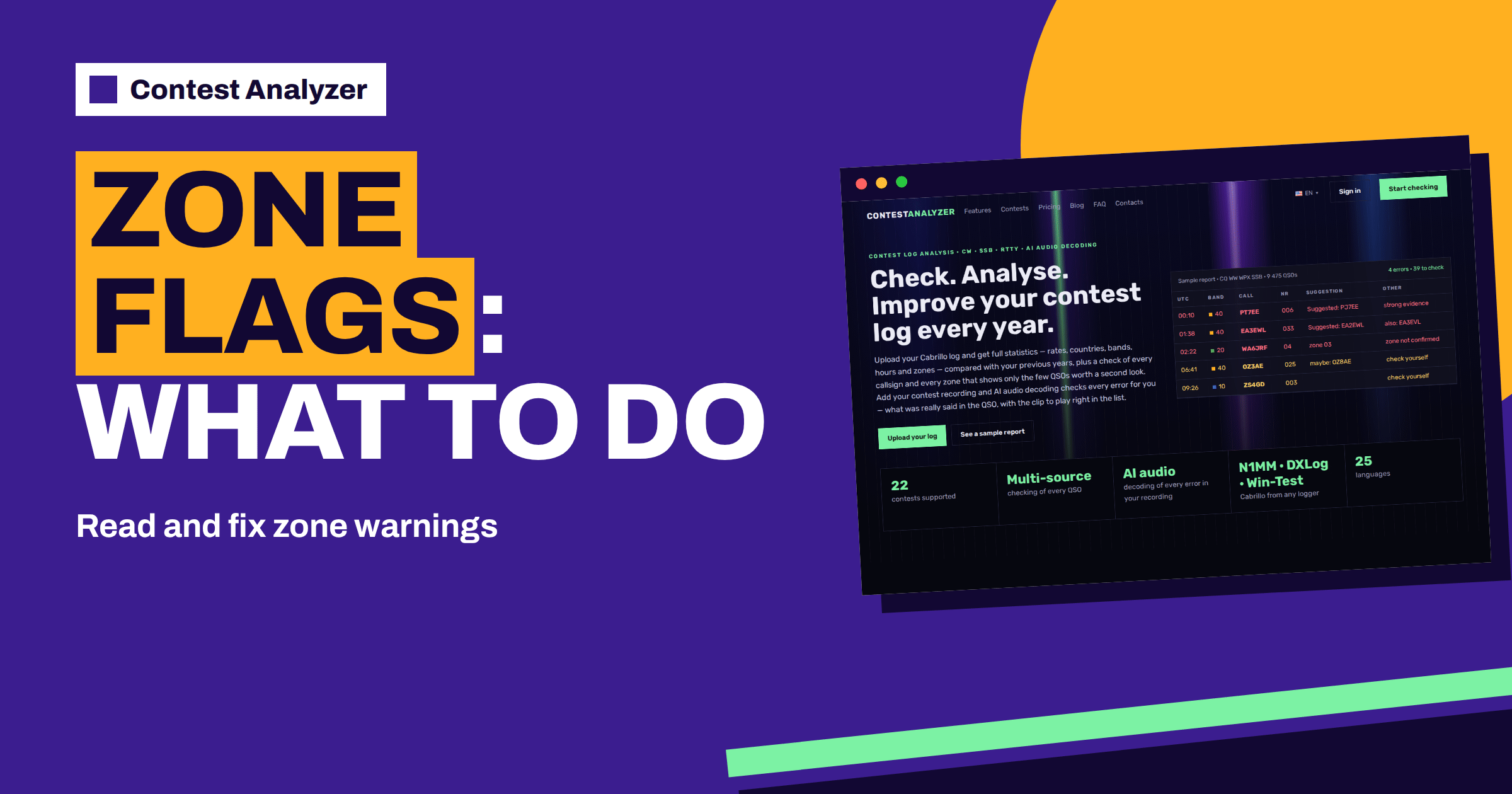
Short answer: Contest Analyzer checks CQ and ITU zones for every QSO. A zone that does not exist in that country is always flagged, and a zone that cannot be confirmed is shown as such in the report, as in the sample report with its note “zone not confirmed”. A flag is a question, not a verdict: compare it with what the other station sent and with your recording, change the zone in the report if you can support it, and download a corrected Cabrillo file.
Why zones are checked at all
In contests such as CQ WW DX and the IARU HF World Championship, the exchange contains a zone, and the zone often also counts as a multiplier. A wrong zone can therefore cost more than a wrong report: it can reduce the QSO and remove a multiplier. Because the zone is a fixed value for a given station, it can be verified in a way that changing serial numbers cannot. The Contest Analyzer home page puts it simply: fixed numbers such as zones are checked, and serial numbers are not.
The site states that CQ and ITU zones are checked for every QSO. This is a different part of the check from the callsign check, and it is useful on its own. A log can have all callsigns right and still contain zone mistakes, especially in contests with a zone exchange and in countries that span several zones. The earlier articles on CQ zones in CQ WW and ITU zones in the IARU HF Championship explain the contest side of the story.
The first kind of flag: a zone that cannot exist
According to the site, a zone that does not exist in that country is always flagged. Imagine a QSO logged with a European station and a zone that belongs to a different part of the world. No contest rule can make that correct, so the report marks it. Such flags are usually easy to understand: the typing was wrong, a field was shifted, or the exchange was copied incorrectly.
The cause is often a simple slip. A digit was mistyped (for example, 14 instead of 15, or 03 instead of 05), a field of the exchange was entered in the wrong box, or a prefilled value from a previous QSO was not replaced. Check what the other station sent. If your recording is available, listen to the exchange in that minute. If you cannot recover the true value, consider the common zone for that country, but be honest that it is a guess.
The second kind: a zone that is not confirmed
The sample report also shows a different note: for WA6JRF with the number 04, the Suggestion column reads “zone 03” and the Other column “zone not confirmed”. This is subtler. The zone as logged is not obviously impossible for the country, but the report could not confirm it for that station, and it points to another value.
Large countries make this case common. The United States, Canada, Russia, Brazil, China and a few others span more than one zone, and the zone depends on where the station is, not on its prefix alone. A station can also be portable or have moved, so the prefix does not always tell the truth. The article about zone errors in multi-zone countries goes through the typical situations, and the one on portable and maritime stations covers calls that do not match their location.
What you can check yourself
When you meet a zone flag, ask four questions. What did the other station actually send? What did my logger fill in automatically? Was the signal clear enough to be sure? And is this station likely to be in a part of the country where the other zone applies? The answers usually point to the right decision.
- If you copied the zone clearly and the signal was strong, your entry is probably right and the report is cautious.
- If the zone came from a prefilled field, the logger may have supplied the usual value for the prefix, and the station may have sent another one.
- If the signal was weak, think of a mistake in copying, as in the article on partial copies and guesses.
- If you have a recording, listen. It is the most reliable test.
Mark the QSOs you have verified in the report, so that your decisions are recorded and you do not have to repeat the work if you come back to the report later.
Changing a zone in the report
You can edit calls, zones, time and frequency right in the report, and you can mark QSOs as checked in your own audio recording. When you are satisfied that a different zone is right, change it, and the corrected data will go into the Cabrillo file that you download. This is much faster than editing the file by hand, and it leaves the original upload untouched.
Keep a note of why you changed each value. A short comment such as “heard 15, logged 14” is enough. If the organiser asks questions about the log later, or if you want to learn from the pattern, the notes will help. And keep the original Cabrillo file, so that you can always go back to what the logger produced.
A short example
Suppose a report shows ten zone flags in a CQ WW log of two thousand QSOs. Three of them are impossible values, clear typing slips that you recognise at once, and you fix them in a minute. Four concern stations in large countries, where the logged zone is plausible but the report prefers another. You listen to your recording for those, and in two cases you hear the other station send the number you logged, so you keep it; in two you hear a different number and you correct it. The last three have a weak signal and no recording. For those you leave the logged value, because you have no evidence against it, and you note the doubt.
The whole job took perhaps twenty minutes, and it removed at least five likely errors. Without the check you would have had no way of knowing which ten QSOs out of two thousand deserved the time. That is the point of a short list: it directs your limited attention to the places where it is most useful.
ITU zones and CQ zones are different things
Do not mix the two systems. CQ zones are used in the CQ contests, ITU zones in the IARU HF World Championship and a few others, and a station can belong to different numbers in the two systems. The report checks both kinds, but the contest you choose decides which one the exchange uses. For that reason the contest has to be selected correctly when you upload: each contest has its own period, bands and exchange built in, as the site says. Using the wrong contest means using the wrong rules.
The contests page lists all 22 supported contests with their modes, dates and log deadlines, and it is a good place to verify that you have the right entry before you upload. For the details of the exchange, read the current official rules of the contest.
Reduce zone errors before the next contest
A zone flag in the report is also a lesson for the future. Count the zone flags in your report and look for a pattern. Do they cluster on one band, at one hour, with one kind of station? If most come from one country, perhaps your logger’s default zone for it is wrong. If they come at night, tiredness is likely. If they come in the early hours of the contest, maybe the exchange macro was not what you intended.
Update the country file in your logger before the contest, as discussed in the article on country file updates, and test the exchange fields with a few practice QSOs. During the contest, confirm the zone of multi-zone countries by ear, and do not trust a prefilled value blindly. After the contest, read your report and add the lesson to your notebook.
What the check does not cover
A zone flag only concerns zones and other fixed values. It does not check serial numbers, and it does not treat dupes as errors. The report also marks QSOs outside the contest period and outside the band limits for your ITU region, with split QSOs shown as a note, but that is a separate matter. Think of the zone check as one lens among several: callsigns, zones, period and bands, each of which looks at your log from a different side.
If you wish to see how the plans and limits work, the pricing page lists them, and the FAQ answers common questions about loggers, privacy and checking time.
Related reading
- Zone Exchange Mistakes on SSB
- Zone Exchange and Cut Number Errors on CW
- Checking Your Log for Likely Errors Before Submitting
The bottom line
A zone flag is a question about one fixed value in one QSO. Check what the other station sent, use your recording where you have one, change the zone in the report only when you can support the new value and download a corrected Cabrillo. Then look for the pattern, so that the same slip does not return in the next contest.
FAQ
Does Contest Analyzer check both CQ and ITU zones?
Yes. The site states that CQ and ITU zones are checked for every QSO.
What happens if a zone does not exist in that country?
It is always flagged. Check your entry and the exchange that was sent.
Can I edit a zone in the report?
Yes. You can edit calls, zones, time and frequency and download a corrected Cabrillo file.
Are serial numbers checked as well?
No. Fixed numbers such as zones are checked, but changing serial numbers are not.
Should I always accept the zone suggested in the report?
No. Accept it only if it agrees with what you heard or with your recording.